













WiiM Bar
Couldn't load pickup availability
Free Shipping On All Orders, No Minimums.
We offer free 2-day shipping on most products within the continental US.
Weekdays - Orders placed by 2pm EST ship same day. Orders placed after 2pm EST will ship the following business day.
Weekends - Orders placed on Saturday and Sunday will ship Monday.
Orders requiring motor freight delivery may take more than two business days. Once your order has shipped, you'll receive a shipping confirmation email with a tracking number for easy tracking.
Orders for Open Box products ship with free ground shipping within the continental United States.
Orders that contain items that are currently backordered, special order, or out of stock will ship complete once all items are in-stock unless otherwise requested.
If you need it faster, you will have the option of choosing a quicker shipping option when you checkout on the website.
At this time, we do not ship internationally and orders to Hawaii and Alaska may incur an additional shipping charge. Please contact us at 888.899.8776 or email support@audioadvice.com to confirm.
Rerouting and Address Changes
We cannot make ANY address changes once an order is placed. If you are unable to accept delivery of your package as ordered, we will need to cancel your order, return the package to sender and have you replace your order through our website.
Keep the Box
We suggest you keep the shipping box or boxes for at least 30 days. It is actually a great idea to keep boxes for audio products for the life of the product. Having the box and all packing will increase the trade-in value should you decide to move up and they are handy to have should you ever need to send the unit in for repair.
How To Receive a Motor Freight Order
The trucking company will contact you to schedule a convenient time to deliver the order. Please note that you must be present for delivery.
Visually inspect the box to make sure you see no signs of damage. If you notice any damage at all, take some pictures with your phone and make a note of them on the delivery receipt the driver will ask you to sign. If it is obvious that the product is damaged, please refuse the order and contact us immediately at 888.899.8776 or email support@audioadvice.com.
Open your box as soon as possible and inspect the product for damage and contact us if you find anything wrong.
FedEx Freight Service Comparison
| Feature / Service | Scheduled Curbside Delivery | White Glove Delivery |
|---|---|---|
| Scheduled delivery appointment | ✔ | ✔ |
| Delivery location | Ground level only (garage, front door, loading dock) | Room of choice, any floor |
| Delivery team | 1 person | 2 people |
| Placement inside home/business | ✘ | ✔ |
| Upstairs / downstairs delivery | ✘ | ✔ |
| Unpacking | ✘ | ✔ (upon request) |
| Packaging removal | ✘ | ✔ (upon request) |
| Assembly / installation | ✘ | ✘ |
| Old item removal | ✘ | ✘ |
At Audio Advice, we pride ourselves on customer satisfaction. We'll bend over backward to make sure you're 100% satisfied and we won't accept anything less. We offer 30-day hassle-free returns and personalized service from real, live people.
If an item doesn't meet your expectations, you may return or exchange it in its original condition and packaging within 30 days for a full refund, minus shipping fees. Items shipped back in like new condition through standard shipping carriers will incur a minimum $15 return shipping fee. If the items were initially shipped through free scheduled delivery via motor freight (commonly referred to as LTL), returning them will result in return shipping fees starting at $150. These items include but are not limited to, oversized items such as TVs, certain subwoofers, floorstanding speakers, furniture, and most items weighing over 75 pounds. Return fees will also apply for exchanges. We want to treat your system as if it is our own and want you to be completely satisfied with your purchase.
Please see the instructions below. We only accept returns for any product purchased directly from our website. If merchandise is not returned in its original condition or is missing packaging, manuals, accessories or other parts, or the resale value of the product has been impaired, a partial refund will be given and calculated on a case-by-case basis.
Non-Returnable Items
The following items cannot be returned or cancelled:
- Special/Custom Order Items
- Gift Cards
- In-ear headphones cannot be returned once the packaging has been opened due to personal hygiene reasons. Please contact our customer care team if you'd like help choosing.
-
Turntables With a Broken Stylus: All turntables ship out with the stylus intact. If you return a turntable or phono cartridge with a broken or missing stylus you will be subject to a return fee. Please be careful when setting up your turntable and contact us with any questions.
Is It Easy To Return An Item?
Yes, simply give us a call at 888.899.8776 or you can email our support team at support@audioadvice.com. Many times our team of experts can help figure out why the product might not be working like you expected and get things fixed over the phone, so don’t be surprised if we ask a few questions, we love troubleshooting!
If our tech help can not make you happy, we will email over a return shipping label with a Return Number.
Hopefully, you saved all of the original item’s box and packaging inserts. You will want to pack back up your return or exchange in the same way it came out of the original box. Once you have everything packaged correctly, tape the box on the top and bottom to assure it stays together. If Audio Advice shipped the item to you inside a second box, it's a good idea to use that same extra box to help prevent damage on its way back to us. To avoid it accidentally coming back to you, use a magic marker to cross out the old shipping label or just tear it off.
The return shipping label we send you will have our address on it, just make sure you take the box to the right shipper (UPS, FEDEX, or USPS) as per the label.
If you are close to one of our stores, please let us know if it is more convenient for you to return it to us directly. You will still need to get a return number by contacting us and shipping and/or restocking charges may apply.
When Will I See My Refund?
It usually takes around 7-14 days for the refund to show up on the payment method you used. We do inspect all returns for damage and accuracy of the item inside the box before issuing a refund. Some items may be subject to shipping and restocking fees.
Can I Exchange My Purchase For Something Different?
Sometimes those big speakers just don’t fit in the room or you might have bought a small subwoofer and later found out you’d love a bigger one. If you would like to make an exchange within 30 days of receiving your item, just give us a call at 888.899.8776 or email support@audioadvice.com and we will help work out the details. Additional shipping charges and return costs may apply.
How Do I Cancel An Order?
If the item has already shipped out or is a special order item, it is not possible to cancel the order. Please contact us at 888.899.8776 or email support@audioadvice.com to start the return process.
What If I Find Shipping Damage?
We need to know right away about any shipping damage. Please contact us at 888.899.8776 or email support@audioadvice.com within 48 hours of your delivery so we can get the ball rolling on making things right. It’s very helpful to take some pictures and email them to us if possible.
Can I Refuse A Shipment?
You can, but unless the item is damaged, shipping and restocking fees will be deducted from your refund. If your item arrives damaged and you are lucky enough to be there, snap some quick pics and refuse the order. Then contact us so we can get a replacement on the way.
What Happens If My Order Is Defective?
This is actually pretty rare, most consumer electronics work fine out of the box 99.9% of the time. We’d like for you to contact us first by calling 888.899.8776 or email support@audioadvice.com so we can help get to the bottom of things. If your item is indeed defective during the first 30 days, we can usually exchange it for a new, replacement unit.
What About Service After 30 Days?
Audio Advice has a great relationship with all of our brands and can help you with warranty service by the brand after our 30-day guarantee period. Even after the warranty expires, we can arrange for service by the brand on products purchased from Audio Advice. Just call 888.899.8776 or email support@audioadvice.com.
How Do You Determine A Restocking Fee?
You may not believe it, but sometimes we receive items back that were put in the box with zero packaging and are completely destroyed or are missing many of the pieces that came with the item. We also track serial numbers and will get back different serial numbers. We’ve even seen different items than what we shipped out be returned. However, it’s very important to package your return properly so that nothing goes missing or gets damaged in shipping, which will result in a restocking fee or even no refund at all. If a product is opened and the market value of the product is reduced, then a restocking fee may be applied to the cost of restocking and the reduced market value of the product. The bottom line is if you treat us fairly, we will do the same.
Audio Advice strives to provide industry-leading support and service while also maintaining the lowest prices available on products for our customers. We work hard with our vendors to bring our customers the best products at each price point. As a part of that process, we work with our vendors to provide the lowest pricing in our stores and on our website.
Our prices should always be the same as any other authorized dealer, including big-box retailers and major online retailers.
If you believe that you have found a lower advertised price from a legitimate authorized seller, call us and let us know so we can make sure we can correct any inadvertent error on our side. As a matter of policy, we update our prices automatically if a vendor changes its authorized pricing policies, so we generally have the best prices all the time. Increasingly, there are knock-off copies of products online, usually sold by non-authorized dealers.
Please be sure that the item meets the following conditions:
- The item is brand new, in stock, and available for purchase
- The item has the identical model number, color, etc as the item on our site.
- The seller is an authorized dealer
As always, our goal is to provide a terrific customer experience, including industry low prices. We appreciate your support.
Overview
The High Notes

True Dolby Atmos With Real Upfiring Drivers

Expand to a Full 5.1.2 System With Discrete Front Channels

A Round Touch Display
WiiM's First Soundbar Can Build a Full Home Theater
The WiiM Bar is WiiM's first soundbar, and it is one of the most interesting products to come out in this category in a while. At $479 it is priced squarely in the middle of a competitive market, but it does something no other soundbar at this price, or really at most prices, can match. We spent time with an early sample before it officially becomes available at Audio Advice, and there is a lot to cover here.

WiiM's Track Record and Why This Soundbar Matters
If you have followed our content on WiiM products, you already know why the brand has built such a loyal following. The WiiM Amp and WiiM Amp Ultra are two of the best value streaming amplifiers on the market. They stream everything, the hardware is well built, and the WiiM Home app is genuinely one of the best audio control apps we have used at any price. WiiM has also demonstrated a consistent commitment to improving their products through firmware updates after launch, which means the product you buy tends to get meaningfully better over time.
The WiiM Bar inherits all of that. It is built on the same app, the same ecosystem, and the same philosophy of delivering capable hardware at an accessible price point. But it also introduces something new to the WiiM lineup: a soundbar that is designed not just to improve your TV audio, but to serve as the foundation for a proper home theater system. That is a big claim for a $479 product, and it is one we can back up after spending real time with it.
Design and Build
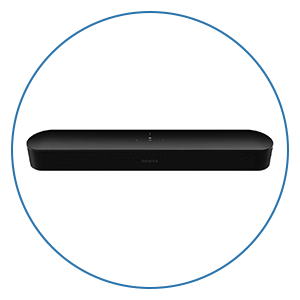
The WiiM Bar comes in at about 41 inches wide, 4 inches tall, and 3 inches deep, which puts it in a good size range for TVs in the 55 to 75-inch class. The build quality throughout is solid. This is not a lightweight plastic bar that feels disposable. The chassis feels dense and well assembled, and it sits low on a TV stand without looking out of place in a modern living room. It is available in multiple color options so you can match it to your setup.
On top of the bar are proximity-lit capacitive touch buttons for volume up and down, play/pause, and source switching. These only light up when your hand approaches, which is a clean design choice that keeps the top panel looking minimal when you are not actively using it. There is also an RGB status LED on the front that uses defined light patterns to communicate things like input selection, Bluetooth pairing mode, active firmware updates, and setup status. It is a subtle but useful feature that tells you what the bar is doing without requiring you to pull out your phone.
Around the back you have all the physical connections: HDMI eARC, optical input, line input, and USB audio that can be configured as either input or output through the WiiM Home app. The included Voice Remote 2 Lite handles basic playback controls and source switching without needing your phone for everyday use.


The Display
The design element that immediately sets the WiiM Bar apart from every other soundbar in this price range is the 2.1-inch round LCD touch screen mounted in the center of the front face, covered in glass. This is not a status indicator or a simple readout. It is a full-color, high-resolution display with touch control, and it is capable of showing a wide range of content depending on what mode you are in and what you have configured.
In music mode, the display can show album art pulled from your streaming service, track and artist information, and source information so you always know what is playing and where it is coming from. It also has VU meters that react to the music in real time, which you can access through Device Settings, Screen Settings, and Playback Screen in the app. The visual feedback of watching levels move in time with music adds a layer of personality to the bar that is hard to explain until you see it in person.
Beyond music, the display offers several analog and digital clock face options, including live clock wallpapers with animated backgrounds. You can also set a custom photo as a wallpaper for the standby screen. Smart Presets can be accessed directly from the display, recently played playlists and stations are surfaced with a tap, and EQ adjustments can be made on the device without opening the app.
In practice, we want to be honest about what this display does well and where its limits are. From normal couch distance, it is too small to read comfortably. You are not going to be sitting ten feet away squinting at it to check the track name. As a primary hands-on control interface from the listening position, it is not really designed for that, and the WiiM Home app is the better tool for detailed control. But as a passive display showing album art while music plays, it looks genuinely great. It gives the bar a visual presence that no other soundbar in this category has, and when a friend walks into the room and sees album art rotating on a small glowing circle in the middle of the soundbar, it always gets a reaction. If you find it distracting during movies or simply prefer a clean look, you can turn it off entirely through the app. We found ourselves leaving it on during music sessions and switching it off for movies, and that felt like the natural way to use it.
Driver Layout and Technical Architecture
Inside the WiiM Bar, the driver layout breaks down into three sections that each serve a specific acoustic purpose.
Across the front of the bar are three mid-woofers and three tweeters. These handle the left, center, and right channels of the front stage and are responsible for the majority of what you hear during movies and music: dialogue, instruments, sound effects, and the overall tonal balance of the system. Having dedicated tweeters and mid-woofers rather than a single full-range driver per channel gives the front stage more separation between the high and low frequencies, which contributes to cleaner dialogue and a wider perceived soundstage.
On top of the bar are two full-range drivers that fire upward toward the ceiling. These are the height channels in the 3.0.2 configuration and are responsible for reproducing the overhead sound objects in Dolby Atmos and DTS:X content.
Low-end support comes from four passive radiators, two on the front face of the bar and two on the rear. Passive radiators work by coupling acoustically to the active drivers inside the enclosure and moving air in response to the pressure they generate. They extend bass response without requiring a separate ported enclosure or a powered woofer, and they are a well-established approach to getting meaningful bass performance out of a slim enclosure. The total system amplification across all eight active drivers is 135 watts.
The full format support list covers LPCM, Dolby Atmos, Dolby TrueHD, Dolby Digital Plus, AC3, DTS, and DTS:X. HDMI eARC is the primary connection for most setups since it carries the full audio signal from your TV including lossless formats, passes CEC commands so your TV remote controls the bar's volume, and handles audio return automatically without requiring any additional configuration.

Dolby Atmos and Height Channel Performance
The channel configuration of 3.0.2 means three front channels and two height channels, and the way those height channels work matters a lot to the overall experience.
A significant number of soundbars that advertise Dolby Atmos support are actually using virtual height processing, which means they are using psychoacoustic tricks and signal processing to create the perception of height from speakers that fire horizontally. The results vary and tend to be position-dependent, meaning the effect works reasonably well in one spot and falls apart as soon as you move. The WiiM Bar uses dedicated upfiring drivers that physically direct sound at the ceiling, where it reflects back down to the listening position. These drivers are reproducing actual height object data from the Atmos signal, which is a fundamentally different approach and one that produces a more convincing and consistent height effect.
To get the best performance from the upfiring drivers, you want a flat ceiling at roughly ten feet or lower with no obstructions, fans, beams, or angled surfaces directly above the bar. In a room that meets those conditions, the height performance is genuinely good. We tested this with Dune and Top Gun Maverick, both of which have some of the best Atmos mixes available, and the sense of overhead sound was convincing in a way that clearly separated it from virtual height processing. Rain, atmospheric effects, and overhead sound objects came from an elevated position rather than collapsing into the front of the room. It is not the same as having dedicated in-ceiling or on-ceiling speakers, and we would not want to oversell it as such, but for a soundbar in this price range the upfiring drivers perform well and we are glad WiiM chose to include them rather than relying on virtualization.
Sound Quality: Movies and Music
For movies in a small to medium-sized room, the WiiM Bar performs well for what it is. The passive radiators do enough work that action sequences have some weight to them and do not feel thin or flat. The low end is not going to compete with a dedicated subwoofer, but it does not disappear the way it does on many soundbars in this class, and the overall presentation has enough body that movies feel like movies rather than TV audio.
Dialogue was the quality we returned to most consistently during testing. It stays clean, forward, and intelligible even in busy action scenes, which is the single most important thing a soundbar can do for day-to-day TV watching. We use The Irishman as a standard reference for soundbar dialogue testing because it has a lot of quiet, naturalistic conversation mixed alongside larger scenes, and voices stayed natural and present throughout without any of the thinness or harshness that cheaper bars can introduce. The dedicated front tweeters contribute meaningfully to this, keeping the upper midrange clear without making voices sound edgy or processed.
On music, the WiiM Bar is balanced and detailed. It is not going to replace a proper stereo setup with a dedicated amplifier and a pair of bookshelf speakers, but for a soundbar that doubles as a music system for casual or background listening, it handles itself well. Streaming over Wi-Fi through the WiiM Home app sounds clean, and the overall tonal balance is even without the kind of bass boost or treble peak that makes some soundbars fatiguing over time.
RoomFit Auto-Calibration
RoomFit is WiiM's built-in room correction system and it is one of the features that makes the most difference to the overall experience if you actually use it. A lot of soundbars in this price range skip auto-calibration entirely, and those that include it often offer something so basic that the practical benefit is minimal.
RoomFit is not as technically deep as Dirac Live or other high-end room correction platforms that we have covered in the context of AV receivers. It is not running a full impulse response measurement or applying complex frequency-dependent correction curves with the same level of precision you would get from a dedicated processor. What RoomFit does is perform a practical acoustic measurement of your space using your phone's microphone, analyze how the bar sounds in your specific room placement, and apply adjustments to improve the overall balance. The process is simple: open the WiiM app, navigate to RoomFit, hold up your phone, stay quiet while the bar plays test tones, and let it adjust. The whole thing takes a few minutes.
The before and after difference is audible in most rooms. Placement issues, room reflections, and boundary effects all influence how a soundbar sounds in a real room, and RoomFit corrects for a meaningful portion of that. For most people buying a soundbar in this price range, this is all the room correction they need, and the ease of running it removes the barrier that more complex calibration systems can introduce.
Audio Processing Modes
Beyond RoomFit, the WiiM Bar includes several audio processing modes that address specific listening situations.
Clear Voice uses AI-based dialogue enhancement to identify and isolate speech in the audio signal, separating it from background music, effects, and ambient noise in real time. This is useful on content where the mix buries dialogue behind a loud soundtrack, and for listeners who have found that TV audio consistently makes it hard to follow what actors are saying. If you have been relying on subtitles more than you would like, Clear Voice addresses that problem directly. It processes the audio in real time without adding noticeable latency or artificial artifacts to the voice quality.
Night Mode reduces the dynamic range of the audio, bringing down loud peaks like explosions and action sequences while preserving the level of dialogue and quieter content. This is a practical feature for late-night watching when you do not want to disturb others in the house but still want to follow what is happening on screen.
Both modes are accessible through the WiiM Home app, through the touch display on the bar, and through the Voice Remote 2 Lite.

Surround Expansion: The Most Important Thing to Understand About This Soundbar
This is where the WiiM Bar separates itself from everything else at this price, and it is more capable than most people will initially realize. The expansion path has two tiers, and understanding both changes how you think about what this product actually is.
Tier One: Adding Surround Speakers
The first tier of expansion involves adding left and right surround speakers to create a proper surround sound field. Through the WiiM Home app you can assign compatible WiiM devices to the surround left and surround right positions, and the system synchronizes them wirelessly with the bar using the WiiM ecosystem.
For the surround positions you can use WiiM Sound speakers, WiiM Sound Lite speakers, a WiiM Amp, or a WiiM Amp Ultra. The WiiM Sound and WiiM Sound Lite are self-contained wireless speakers that connect to the WiiM network and receive their audio signal over Wi-Fi, which means no speaker cable has to run to the surround positions. This is a significant practical advantage in a real living room where running cable to the back of the room is not always feasible. The WiiM Amp and WiiM Amp Ultra are amplifier options that let you power passive bookshelf speakers at the surround positions, which opens up the choice of surround speaker to essentially any passive speaker you want to use.
Once surround speakers are assigned and the app confirms the layout, the result is genuine left and right surround separation rather than a soundbar trying to create a surround impression from the front of the room. Sound wraps around you during movies, off-screen sound effects come from the correct direction, and the overall sense of immersion is significantly better than the bar operating on its own.
Tier Two: Adding Front Left and Right Speakers and Turning the Bar Into a Dedicated Center Channel
This is the capability that makes the WiiM Bar unlike anything else in this category, and it is worth explaining carefully because the implications are significant.
In addition to assigning surround speakers, the WiiM Home app also allows you to assign dedicated front left and right speakers to the system. Add a pair of WiiM Sound or Sound Lite speakers to the front of the room positioned to the left and right of your TV, or use a WiiM Amp or Amp Ultra to drive passive bookshelf speakers in those positions, and the WiiM Bar is no longer trying to reproduce left, center, and right from a single enclosure. Instead, the bar becomes a dedicated center channel only, while real discrete speakers handle the front left and right.
What this achieves is something that defines how professional home theater systems are designed: true front stage separation. In a traditional home theater setup with separate left, center, and right speakers, each channel has its own dedicated speaker with its own acoustic position in the room. Dialogue and center-panned content come from the center speaker directly in front of you. Music, panned effects, and the stereo content of the soundtrack come from the left and right speakers at the correct width. The front stage sounds big, open, and spatially accurate because the channels are physically separated rather than blended together from a single enclosure trying to simulate three directions at once.
The WiiM Bar with front left and right speakers delivers exactly this. The bar handles center channel duties only, which means it focuses entirely on dialogue, center-panned sound effects, and the acoustic content that belongs in the middle of the front stage. Voices lock to the screen with a precision that soundbars operating as left, center, and right combined simply cannot achieve. The front speakers handle width and stereo imaging. The result is a front stage that sounds more like a proper speaker system than a soundbar.
Add surround speakers at the left and right rear positions and you have a system with five discrete channels covering the full horizontal plane around the listening position. Add the WiiM Sub Pro for low end support and you have a full 5.1.2 home theater system with real discrete speakers at every position. That is an extraordinary capability for a soundbar ecosystem at this price point, and it is something that even the Sonos Arc Ultra, the Bluesound Pulse Cinema, and other top soundbar systems cannot offer.
Adding the WiiM Sub Pro
The WiiM Bar has no dedicated wired subwoofer output, so the only subwoofer option in the WiiM ecosystem is the WiiM Sub Pro, which connects wirelessly. It is a $449 subwoofer built around a custom 8-inch driver with 250 watts of continuous power and frequency extension down to 25Hz.
The Sub Pro runs its own RoomFit auto-calibration, which measures the bass response in your room and adjusts the output accordingly. Beyond that, the WiiM Home app gives you full manual control over crossover frequency, phase, level, and latency so you can dial in the integration between the sub and the bar to your own preference rather than relying entirely on automatic settings.
Adding the Sub Pro makes a meaningful difference to the system. Taking low-end responsibility away from the soundbar's passive radiators allows the bar to focus on the frequencies it handles well, and the increase in bass extension and impact during movies is immediately noticeable on content where low-frequency effects are a significant part of the experience.

How We Tested the Full System
We ran the WiiM Bar first as a standalone 3.0.2 system to establish a baseline, then added a pair of WiiM Sound Lites as surround left and right, and then brought in two more Sound Lites as front left and right, turning the bar into a dedicated center channel. We also added the WiiM Sub Pro for the subwoofer position.
The standalone bar performed well for its size and price. Adding the Sound Lite surrounds improved the sense of immersion noticeably, particularly on Dune where the film's directional sound design could fully utilize the rear channels. Surround panning was smooth and the channels blended without obvious handoff artifacts.
Adding the front left and right speakers was where the system made its biggest leap. The front stage opened up considerably, and voices in particular took on a presence and a sense of position that the bar handling left, center, and right could not produce. The separation between the three front channels was clean and the overall sound was much more consistent with what you hear from a properly set up traditional home theater than from any soundbar configuration we have tested.
How Does the WiiM Bar Compare to Sonos Arc Ultra?
The Sonos Arc Ultra with a pair of Era 100s is one of the most capable soundbar-based surround systems available and is a reasonable comparison point at a higher price. The Sonos setup sounds bigger out of the box and fills a large room more convincingly on its own. The raw scale of the Arc Ultra is hard to argue with.
But when you configure the WiiM system with four Sound Lites handling front left, front right, surround left, and surround right alongside the WiiM Bar as a dedicated center channel and the Sub Pro handling low end, the WiiM system is extremely immersive in a way the Arc Ultra setup cannot replicate. The Arc Ultra cannot assign dedicated front left and right speakers. It remains the left, center, and right source regardless of what you add to it. The kind of front stage separation the WiiM system achieves with discrete front speakers is simply not possible with Sonos or most other soundbar systems at any price.
Connectivity
The WiiM Bar covers the connectivity bases you would expect from a modern living room setup.
HDMI eARC is the primary audio connection and handles the full range of supported formats including lossless audio from a Blu-ray player or streaming device connected to your TV. It also passes CEC commands so your TV remote controls the bar's volume. There is an optical input for TVs or sources without HDMI eARC, and a line input for analog sources.
Networking runs over Wi-Fi 6E across 2.4GHz, 5GHz, and 6GHz bands, with Ethernet available for a wired connection. Bluetooth 5.4 is on board with LE Audio support arriving via a future firmware update. USB host support lets you connect a drive containing a personal music library and use the WiiM Bar as a media server for other WiiM and DLNA devices on your network.
Streaming support covers Spotify Connect, TIDAL Connect, Qobuz Connect, Google Cast, Amazon Music Cast, DLNA, Roon, LMS, Qplay 3.0, and around 20 additional services directly through the WiiM Home app. One thing worth noting is that the WiiM Bar does not support AirPlay, so if AirPlay is part of your daily listening workflow that is worth keeping in mind.
App and Control Options
The WiiM Home app is the primary control surface and it is one of the best audio apps available at this price. It covers everything: playback control across all streaming services, full EQ with both preset and custom options, Smart Presets for one-tap shortcuts to specific content sources and sound modes, multi-room grouping with other WiiM speakers and amplifiers, RoomFit calibration, home theater speaker assignment, and firmware update management. The app is clean, fast, and well organized, and it gives you access to deep settings without making simple everyday tasks complicated.
For hands-on control, the capacitive buttons on top of the bar cover the basics. The touch display handles source switching, EQ, Smart Presets, and recently played content. Voice control is available through both Alexa and Google Assistant. The included Voice Remote 2 Lite handles playback and volume without needing any of the above.

Who Is the WiiM Bar Best For?
Already in the WiiM ecosystem. If you own a WiiM Amp, Amp Ultra, WiiM Sound, or Sound Lite, the WiiM Bar is the most direct way to build a proper home theater system around what you already have. The surround and front stage expansion capability is unique and the setup process through the app is straightforward.
Starting fresh under $500. If you want a Dolby Atmos soundbar under $500 that can grow into a real surround system with discrete channels, the WiiM Bar is one of the most capable options at this price. Room correction is easy, streaming support is excellent, and the sound quality for movies and music is strong for what it costs.
Small to medium-sized rooms. The WiiM Bar performs particularly well in these environments. In a very large room the bar on its own will show its limits, and the surround expansion with a subwoofer becomes more important to filling the space properly.
Anyone building a wireless home theater without running cable. The ability to build a full 5.1.2 system with genuine discrete front left, center, right, surround left, and surround right channels entirely over Wi-Fi, using compact WiiM devices that do not require speaker cable to the surround or front positions, is a real alternative to a traditional wired home theater in rooms where cable management is a constraint.
Final Thoughts
The WiiM Bar at $479 is a well-designed, well-featured soundbar that performs above its price in terms of both sound quality and capability. The Dolby Atmos upfiring drivers work, the room correction makes a real difference, the streaming platform is among the best available, and the display gives the bar a personality that no other soundbar in this category has.
But the reason the WiiM Bar stands out is the expansion system. The ability to assign dedicated front left and right speakers alongside surrounds, turning the soundbar into a true center channel within a fully discrete wireless home theater setup, is genuinely unique. Most soundbars at any price cannot do this. The WiiM ecosystem makes it possible in a way that is accessible, affordable, and easy to configure, and the results in listening are exactly as good as the concept suggests.
We’re Here to Help!
If you have further questions, contact our experts via chat, phone, or email. Or simply visit one of our world-class showrooms to experience speakers, projectors, TVs, and everything in between for yourself before you make a purchase!
If you’re planning your home theater or media room, check out our Home Theater Design page, where we have everything Home Theater related, including our FREE Home Theater Design Tool.
When you buy from Audio Advice, you’re buying from a trusted seller since 1978. We offer Free Shipping, Lifetime Expert Support, and our Price Guarantee. We look forward to serving you!

Details & Specs
Redefine Your Living Room Audio
WiiM Bar is a display-first 3.0.2 Dolby Atmos soundbar that lets you see, control, and expand your home audio experience. Its glass-covered, vibrant 2.1-inch round touch display shows album art, track information, time, EQ, Smart Presets, Recently Played content, clock faces, dynamic wallpapers, and playback/source controls directly on the device. Built with an 8-driver array, 4 passive radiators, top-firing height channels, and RoomFit auto-correction, WiiM Bar delivers immersive sound for movies, TV, and music.
Group with compatible WiiM devices to expand from a single soundbar into a 5.1.2 home theater system with wireless surrounds and subwoofer support—all managed through touch, voice, or the WiiM Home App.
Key Features
- See the Sound: A glass-covered, vibrant 2.1-inch round touch display puts album art, track info, time, EQ, Smart Presets, Recently Played content, clock faces, dynamic wallpapers, and playback/source controls right on the soundbar.
- Immersive 3.0.2 Dolby Atmos and DTS:X Playback: Top-firing height channels, HDMI eARC, and support for LPCM, Dolby Atmos/TrueHD/DD+, AC3, DTS, and DTS:X help deliver cinematic sound for movies, TV, and games.
- Expandable 5.1.2 WiiM Home Theater: Start with a 3.0.2 Dolby Atmos soundbar and group with compatible WiiM devices to add wireless surrounds and subwoofer support, expanding into a 5.1.2 home theater system.
- 8-Driver Acoustic System with 4 Passive Radiators: Three front mid-woofers, three front tweeters, two top full-range height drivers, and four passive radiators work together to support a wide soundstage, clear vocals, height effects, and bass performance from a single soundbar.
- RoomFit Auto-Correction: RoomFit helps tailor playback to your space, optimizing the listening experience for different room layouts and placements.
- Clear Voice, AI Dialog Enhancement, and Night Mode: Dialogue-focused listening modes help improve vocal clarity, while Night Mode helps manage the dynamic range for lower-volume or late-night listening.
- Stream Your Way: Stream 20+ music services directly from the WiiM Home App, or connect through Google Cast Audio, Spotify Connect, TIDAL Connect, Qobuz Connect, Amazon Music Cast, DLNA/UPnP, Qplay 3.0, LMS, and Roon.
- Wi-Fi 6E and Bluetooth with LE Audio: Wi-Fi 6E, Ethernet, and Bluetooth with LE Audio provide flexible connectivity for streaming, control, and everyday listening.
- Scalable Whole-Home Audio: Seamlessly integrates with WiiM Amp, Ultra, Pro, Mini, and Edition speakers for synchronized multi-room music grouping.
- Control Your Way: Manage EQ, Smart Presets, and routines via the WiiM Home App, Alexa, Google Assistant, or the included Voice Remote 2 Lite.
- Future-Proof Performance: Regular firmware updates continuously unlock new features, services, and audio enhancements.
| Model | WiiM Bar |
|---|---|
| Channel Layout | 3.0.2, expandable to 5.1.2 with sub/surround |
| Max Power | 135 W system |
| Front Drivers | 3 × 110 × 52 mm mid-woofers + 3 × 52 × 52 mm tweeters |
| Top Height Drivers | 2 × 52 × 52 mm full-range |
| Passive Radiators | 4 × 115 × 50 mm, front × 2, rear × 2 |
| Audio Formats | LPCM, Dolby Atmos/TrueHD/DD+, AC3, DTS/DTS:X |
| Audio Ports | HDMI eARC, Optical, Line In, USB Audio In configurable via software |
| USB Audio Out | Configurable via software |
| Power Input | 100–240 V AC |
| Wi-Fi | Wi-Fi 6E, 802.11 b/g/n/ax, 2.4 GHz, 5 GHz, and 6 GHz triple bands |
| Bluetooth | Bluetooth 5.4 with BLE, A2DP Rx/Tx, AVRCP, HID, LE Audio via software update |
| Ethernet | 10M/100 Mbps |
| Streaming | Google Cast / Chromecast Audio, Spotify Connect, TIDAL Connect, Qobuz Connect, Amazon Music Cast, DLNA/UPnP, Qplay 3.0, LMS, Roon |
| USB Host for Storage | Access personal media library and use it as a standalone media server for other WiiM and DLNA devices |
| Display | Glass-covered vibrant 2.1" round touch display |
| Display Features | Time/track info, album art, play/pause/skip/like, source selection, preset and custom EQs, Smart Preset, Recently Played, clock faces, dynamic wallpapers, album art standby |
| LED | RGB+W status LED with defined patterns for setup, Bluetooth pairing, inputs, OTA, and errors |
| Buttons | Proximity-lit capacitive buttons: Volume +, Volume -, Play/Pause, Source Switch |
| Touch Screen | 2.1" Hi-Res full color LCD touch screen |
| Dimensions | 41.7" W × 4.1" D × 2.9" H (1060 × 105 × 74 mm); 2.8" H (70 mm) without foot |
| Weight | 11.02 lb (5 kg) |


