











madVR Envy Core MK2
Couldn't load pickup availability
Free Shipping On All Orders, No Minimums.
We offer free 2-day shipping on most products within the continental US.
Weekdays - Orders placed by 2pm EST ship same day. Orders placed after 2pm EST will ship the following business day.
Weekends - Orders placed on Saturday and Sunday will ship Monday.
Orders requiring motor freight delivery may take more than two business days. Once your order has shipped, you'll receive a shipping confirmation email with a tracking number for easy tracking.
Orders for Open Box products ship with free ground shipping within the continental United States.
Orders that contain items that are currently backordered, special order, or out of stock will ship complete once all items are in-stock unless otherwise requested.
If you need it faster, you will have the option of choosing a quicker shipping option when you checkout on the website.
At this time, we do not ship internationally and orders to Hawaii and Alaska may incur an additional shipping charge. Please contact us at 888.899.8776 or email support@audioadvice.com to confirm.
Rerouting and Address Changes
We cannot make ANY address changes once an order is placed. If you are unable to accept delivery of your package as ordered, we will need to cancel your order, return the package to sender and have you replace your order through our website.
Keep the Box
We suggest you keep the shipping box or boxes for at least 30 days. It is actually a great idea to keep boxes for audio products for the life of the product. Having the box and all packing will increase the trade-in value should you decide to move up and they are handy to have should you ever need to send the unit in for repair.
How To Receive a Motor Freight Order
The trucking company will contact you to schedule a convenient time to deliver the order. Please note that you must be present for delivery.
Visually inspect the box to make sure you see no signs of damage. If you notice any damage at all, take some pictures with your phone and make a note of them on the delivery receipt the driver will ask you to sign. If it is obvious that the product is damaged, please refuse the order and contact us immediately at 888.899.8776 or email support@audioadvice.com.
Open your box as soon as possible and inspect the product for damage and contact us if you find anything wrong.
FedEx Freight Service Comparison
| Feature / Service | Scheduled Curbside Delivery | White Glove Delivery |
|---|---|---|
| Scheduled delivery appointment | ✔ | ✔ |
| Delivery location | Ground level only (garage, front door, loading dock) | Room of choice, any floor |
| Delivery team | 1 person | 2 people |
| Placement inside home/business | ✘ | ✔ |
| Upstairs / downstairs delivery | ✘ | ✔ |
| Unpacking | ✘ | ✔ (upon request) |
| Packaging removal | ✘ | ✔ (upon request) |
| Assembly / installation | ✘ | ✘ |
| Old item removal | ✘ | ✘ |
At Audio Advice, we pride ourselves on customer satisfaction. We'll bend over backward to make sure you're 100% satisfied and we won't accept anything less. We offer 30-day hassle-free returns and personalized service from real, live people.
If an item doesn't meet your expectations, you may return or exchange it in its original condition and packaging within 30 days for a full refund, minus shipping fees. Items shipped back in like new condition through standard shipping carriers will incur a minimum $15 return shipping fee. If the items were initially shipped through free scheduled delivery via motor freight (commonly referred to as LTL), returning them will result in return shipping fees starting at $150. These items include but are not limited to, oversized items such as TVs, certain subwoofers, floorstanding speakers, furniture, and most items weighing over 75 pounds. Return fees will also apply for exchanges. We want to treat your system as if it is our own and want you to be completely satisfied with your purchase.
Please see the instructions below. We only accept returns for any product purchased directly from our website. If merchandise is not returned in its original condition or is missing packaging, manuals, accessories or other parts, or the resale value of the product has been impaired, a partial refund will be given and calculated on a case-by-case basis.
Non-Returnable Items
The following items cannot be returned or cancelled:
- Special/Custom Order Items
- Gift Cards
- In-ear headphones cannot be returned once the packaging has been opened due to personal hygiene reasons. Please contact our customer care team if you'd like help choosing.
-
Turntables With a Broken Stylus: All turntables ship out with the stylus intact. If you return a turntable or phono cartridge with a broken or missing stylus you will be subject to a return fee. Please be careful when setting up your turntable and contact us with any questions.
Is It Easy To Return An Item?
Yes, simply give us a call at 888.899.8776 or you can email our support team at support@audioadvice.com. Many times our team of experts can help figure out why the product might not be working like you expected and get things fixed over the phone, so don’t be surprised if we ask a few questions, we love troubleshooting!
If our tech help can not make you happy, we will email over a return shipping label with a Return Number.
Hopefully, you saved all of the original item’s box and packaging inserts. You will want to pack back up your return or exchange in the same way it came out of the original box. Once you have everything packaged correctly, tape the box on the top and bottom to assure it stays together. If Audio Advice shipped the item to you inside a second box, it's a good idea to use that same extra box to help prevent damage on its way back to us. To avoid it accidentally coming back to you, use a magic marker to cross out the old shipping label or just tear it off.
The return shipping label we send you will have our address on it, just make sure you take the box to the right shipper (UPS, FEDEX, or USPS) as per the label.
If you are close to one of our stores, please let us know if it is more convenient for you to return it to us directly. You will still need to get a return number by contacting us and shipping and/or restocking charges may apply.
When Will I See My Refund?
It usually takes around 7-14 days for the refund to show up on the payment method you used. We do inspect all returns for damage and accuracy of the item inside the box before issuing a refund. Some items may be subject to shipping and restocking fees.
Can I Exchange My Purchase For Something Different?
Sometimes those big speakers just don’t fit in the room or you might have bought a small subwoofer and later found out you’d love a bigger one. If you would like to make an exchange within 30 days of receiving your item, just give us a call at 888.899.8776 or email support@audioadvice.com and we will help work out the details. Additional shipping charges and return costs may apply.
How Do I Cancel An Order?
If the item has already shipped out or is a special order item, it is not possible to cancel the order. Please contact us at 888.899.8776 or email support@audioadvice.com to start the return process.
What If I Find Shipping Damage?
We need to know right away about any shipping damage. Please contact us at 888.899.8776 or email support@audioadvice.com within 48 hours of your delivery so we can get the ball rolling on making things right. It’s very helpful to take some pictures and email them to us if possible.
Can I Refuse A Shipment?
You can, but unless the item is damaged, shipping and restocking fees will be deducted from your refund. If your item arrives damaged and you are lucky enough to be there, snap some quick pics and refuse the order. Then contact us so we can get a replacement on the way.
What Happens If My Order Is Defective?
This is actually pretty rare, most consumer electronics work fine out of the box 99.9% of the time. We’d like for you to contact us first by calling 888.899.8776 or email support@audioadvice.com so we can help get to the bottom of things. If your item is indeed defective during the first 30 days, we can usually exchange it for a new, replacement unit.
What About Service After 30 Days?
Audio Advice has a great relationship with all of our brands and can help you with warranty service by the brand after our 30-day guarantee period. Even after the warranty expires, we can arrange for service by the brand on products purchased from Audio Advice. Just call 888.899.8776 or email support@audioadvice.com.
How Do You Determine A Restocking Fee?
You may not believe it, but sometimes we receive items back that were put in the box with zero packaging and are completely destroyed or are missing many of the pieces that came with the item. We also track serial numbers and will get back different serial numbers. We’ve even seen different items than what we shipped out be returned. However, it’s very important to package your return properly so that nothing goes missing or gets damaged in shipping, which will result in a restocking fee or even no refund at all. If a product is opened and the market value of the product is reduced, then a restocking fee may be applied to the cost of restocking and the reduced market value of the product. The bottom line is if you treat us fairly, we will do the same.
Audio Advice strives to provide industry-leading support and service while also maintaining the lowest prices available on products for our customers. We work hard with our vendors to bring our customers the best products at each price point. As a part of that process, we work with our vendors to provide the lowest pricing in our stores and on our website.
Our prices should always be the same as any other authorized dealer, including big-box retailers and major online retailers.
If you believe that you have found a lower advertised price from a legitimate authorized seller, call us and let us know so we can make sure we can correct any inadvertent error on our side. As a matter of policy, we update our prices automatically if a vendor changes its authorized pricing policies, so we generally have the best prices all the time. Increasingly, there are knock-off copies of products online, usually sold by non-authorized dealers.
Please be sure that the item meets the following conditions:
- The item is brand new, in stock, and available for purchase
- The item has the identical model number, color, etc as the item on our site.
- The seller is an authorized dealer
As always, our goal is to provide a terrific customer experience, including industry low prices. We appreciate your support.
Overview
Audio Advice is the world’s largest retailer of madVR Envy video processors and the leader in remote setup and calibration. Our team has completed more madVR installations than anyone in the U.S., giving us unmatched expertise in optimizing its performance. We recommend speaking with our specialists before placing your order to ensure seamless compatibility with your system and to establish a tailored calibration plan for the best possible results.
Core MK2 – Advanced Processing, Price/Performance Leader, 8K Ready
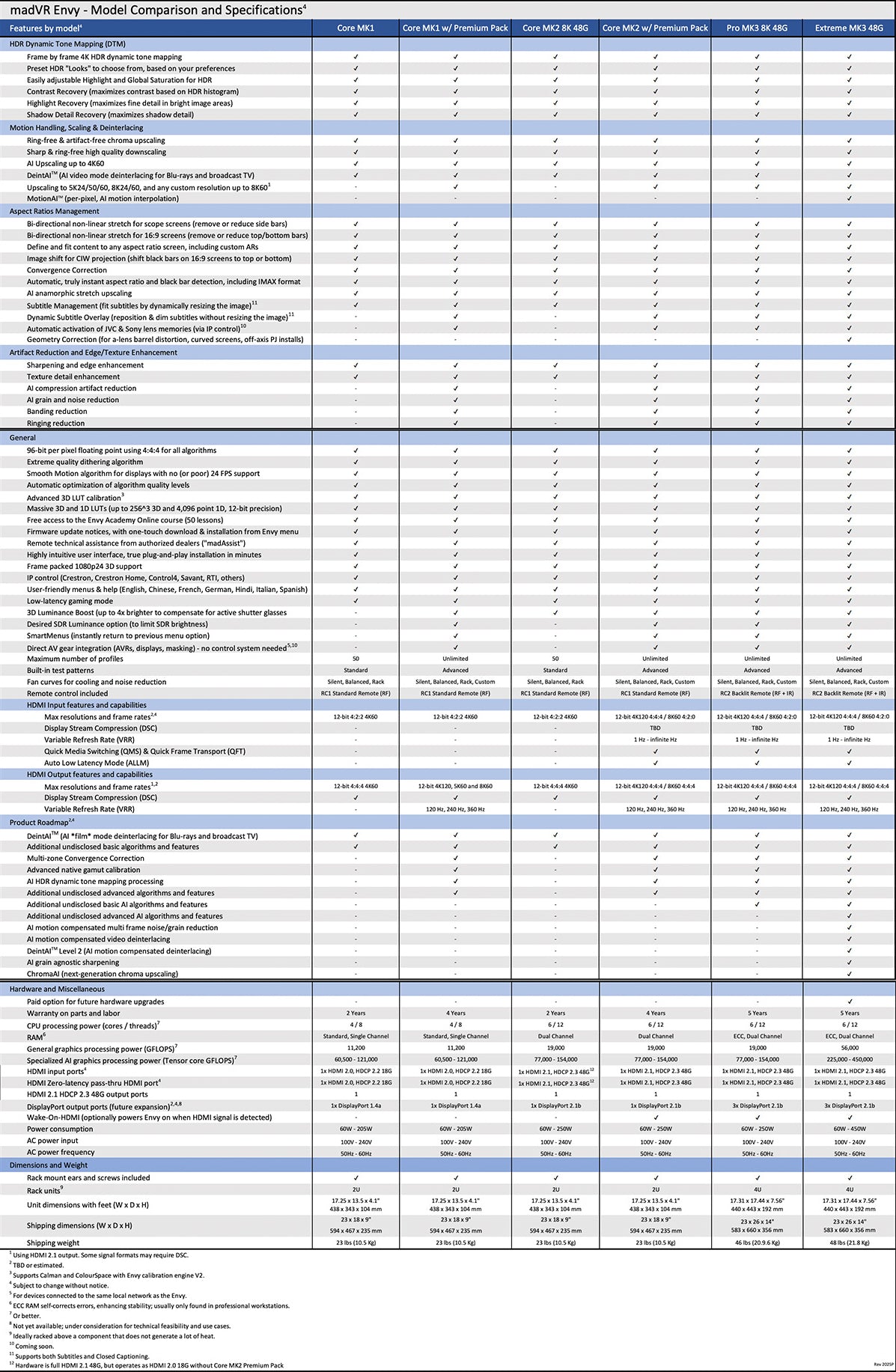
The Envy Core MK2 builds on the popular Core MK1 and delivers major hardware advances, including a powerful NVIDIA 5060 GPU, a more robust CPU, and doubled RAM. It is 8K-ready, with support for HDMI 2.1 and full 48 Gbps input and output bandwidth for the highest-quality signals today and into the future.
For users seeking full 8K input/output upscaling and processing and the most aggressive low-latency gaming, the Core MK2 Premium package (*additional charge) unlocks these capabilities, adds other advanced features such as patent-pending Dynamic Subtitle OverlayTM, and doubles the warranty from 2 to 4 years - delivering unmatched power, performance and price in its class, helping to make reference-level video processing more accessible than ever.
Despite its aggressive price, the Core MK2 offers full HDMI 2.1 capabilities alongside the award-winning feature set that defines Envy, including patented HDR dynamic tone mapping, instant aspect ratio management, bi-directional patent-pending Non-Linear Stretch (NLS+) for scope and 16:9 screens, AI upscaling, and DeinterlaceAITM, the world’s first AI deinterlacing engine in a video processor.
Like the Core MK1, the Core MK2 is well-positioned to continue as a popular choice to pair with projectors, UST projectors, and high-end flat-panel TVs, popular on such displays for industry-leading AI upscaling, dynamic tone mapping, and non-linear stretch to reduce black bars without cropping content - and now enhanced with its new gaming performance.
madVR Envy Core Features
Dynamic Tone Mapping (DTM) for HDR Content
So, what are all the great things that make the Envy such a unique piece of gear? First, you have probably heard about High Dynamic Range, or HDR and Wide Color Gamut. These two new processes, coupled with 4K resolution, can deliver an entirely new level of realism and visual impact when done right. But doing it right in our homes has one very big challenge.
Most HDR mastering is done based on having a very high amount of brightness available on the display device. This can range from 1000 to 10,000 Nits. The problem is the best current televisions are usually only able to produce 600-1000 nits and most front projectors are delivering in the 50-150 nit range.
This was addressed by the display manufacturers with Tone Mapping where the output is adjusted based on the actual brightness range available on the display. The first attempt at this used static tone mapping for the entire HDR movie which resulted in a very dark image, which you’ve likely experienced.
The Envy products have you input the nit level of your display and use that to perform Dynamic Tone Mapping where every single frame is independently analyzed and sophisticated algorithms are used to produce the best looking image.
For the vast majority of people, Audio Advice or another great dealer will handle setting all of this up for you. However, for those of you who are really into playing with your settings, you can tweak to your heart's content.


The image on the left is from a very high-end front projector but without the Envy in the signal path. The one on the right is with the Envy. Just take a look at the bottom left area where a lightning bolt is striking Harry's hand. Without the Envy, it is just completely white, with no detail or color. But with the Envy, the full detail and color are clearly seen, providing a much more exciting image. The same can be seen in the faces at the upper left and right sides. Without the Envy, you can just barely make out that these are faces, and are mostly whited out. But with the Envy, they are clearly seen, with full detail and color. Similar examples could be used where the Envy provides the same benefit on the darker end, preserving shadow details.
Aspect Ratio Management
Another feature we really love and use a lot is the Aspect Ratio Management. There are many different aspect ratios in the content we enjoy. From 16:9, to 2.00:1, used a lot on Netflix, to 2.40:1 for most movies, there is a huge range of ratios.
If you have a 16:9 display and watch a widescreen movie, you’ll see black bars at the top and bottom of your screen. The Envy allows you to automatically move the entire image up or down, eliminating one of those black bars. But the big deal is for those of us with scope or widescreen front projection systems. If you have a system like this, you are probably using lens memory on your projector to switch between the aspect ratios, which can take 10-20 seconds, and those set points can drift a little over time if you move between them a lot.
The Envy can be set to scale the image for the full height of your screen automatically and instantly. Think how much more fun Christopher Nolan movies that use multiple aspect ratios are with this feature!
Non Linear Stretch
If you are a sports fan with a widescreen front projector, you will probably love the nonlinear stretch feature. Almost all sporting events are broadcast in 16:9, leaving big black bars on the sides of your widescreen. You can set up the Envy to smartly remove the black bars. In many of the theaters we set up, we have the Envy slightly crop off part of the top and bottom, which is usually unused content. Then we have it ever so slightly stretch the image towards the outer parts, which are less important than the center. The end result is that during a Super Bowl party, the screen is totally filled and incredibly immersive. Once you have things set up, they will be recalled and used instantly and automatically.

Subtitles
If you watch a lot of foreign films on a 2.40:1 widescreen, you have likely run into the issue where they put the subtitles below the image. When you adjust the image to fill your widescreen, the subtitles disappear and you have to switch back to 16:9 to see them, which drastically shrinks your image. Well the Envy allows you to have it ever so slightly shrink the image so you can see the subtitles as you can see here. This is a huge benefit, and it works quite well. And even better, it does this automatically, needing no button pushes!

What you see without the Envy’s Subtitle Management

What you now see after turning on the Envy’s Subtitle Management

Upscaling
As all video enthusiasts know, HD content has to be upscaled for your 4K projector or TV. This can take place at the source, your AVR or Pre-Pro, or the display. These can do a decent job but have nowhere near the processing power of the Envy. To my eyes, the Envy makes HD content look almost as sharp and detailed as a true 4K image.
The Envy also has a whole host of settings to further improve the image. These include options for sharpness and edge enhancement as well as other features. We find that adding just a little Sharpening to Upscaled HD material provides a significant improvement in image quality. And a little noise reduction makes watching older, grainier movies more enjoyable.
Anamorphic Stretch
If you happen to be using an anamorphic lens with your scope screen, you know your projector only gives you two modes. Well, the Envy takes care of this with an infinite number of possible modes, letting you take advantage of your lens's advantages — and it’s all automatic!
As you might imagine, there are a bunch of other amazing things the Envy can do. However, in our opinion, most people purchasing the Core are going to get it because it takes the picture quality in their room to a whole new level and because of the features we just covered.
Operation & Setup
You would think that with so many sophisticated features, the Envy would be a challenge to set up. It's actually the exact opposite. You simply plug the Envy in, connect your network cable, plug in an HDMI cable between your receiver or processor and the Envy, and then HDMI out from the Envy to your TV or projector. That’s it. Your dealer will then configure the Envy based on your system and personal preferences. Your dealer can then nail all of the settings in person or can establish a Remote connection to your Envy, and walk through the Settings, as if they were in the room with you, and quickly fine-tune your setup. We have numerous customers with vacation homes in remote locations and have become incredibly adept at remotely setting these up for them.
madVR Envy Core Premium Pack
One of the reasons is that madVR Labs did something really smart in the design of the Core. There are a handful of features that some people may want but there was simply no way to offer such an aggressive price point with everything. Therefore, madVR Labs has added the ability to unlock additional features for more advanced users through the purchase of the Core Premium Package directly from madVR Labs, which currently costs $995. The primary features added by this Premium Pack are dynamic subtitle overlay, automatic activation of JVC and Sony lens memory over IP, some AI-based artifact and noise reduction, some advanced test patterns, unlimited profiles, and upgrading the warranty from 2 years to 4 years. In addition to the normal firmware updates that the Core will receive, the Premium Pack will also receive additional advanced features in the future. In our opinion, especially with the Core Premium add-on, most people on a budget can confidently choose the Core over the Pro and not worry about leaving much on the table, even though the Pro will gain more features over time. Again, if you really want to get into the details, talk to your dealer or check out the full side-by-side comparison. The smaller, lighter-weight design of the Core makes it way more flexible in terms of installation for all media rooms and theaters. With the Nvidia 4060 GPU, and the superb Envy processing, the Core is going to set a new standard in the world for video processor price to performance. For many of you, this is pretty much all you need to know, and it's probably clear the Core is the right model for you if the Pro and Extreme are beyond your budget. The Envy has so many bells and whistles that we could spend well over an hour discussing them. But let us just cover a few more, particularly for those of you who love to tweak your system
Profiles
madVR Envys all use a system called Profiles, for grouping and recalling a set of configurations and settings. For example, our primary use of profiles is that we have the system use its aspect ratio and nonlinear stretch capabilities to fill a 2.4 screen for all content for daily viewing. But when we want to watch a 16:9 movie exactly as it was produced, we hit one button, and it removes all stretching and other adjustments to give us the perfect 16:9 picture.

Additionally, every setting in the Envy can be active, temporary, or base. Once you make a change, it goes into temporary. If you decide you like the changes you see you can save them to a profile or to your base settings. The unit backs itself up every day, so you don’t need to worry about messing anything up when playing with the options. Our team at Audio Advice has set up enough Envys now, that we can really quickly figure out through a few questions what a customer wants, and then we implement our best practices that we use in our homes to achieve that.
Firmware Updates
Now, let’s talk about firmware updates. For the vast majority of people, your MadVR Envy will just get installed, and you’ll set it and forget it. However, if you are really into this stuff and want to experience new features as they roll them out, the Envys have an update system that is super easy! The Envy updates the firmware in 15 to 30 seconds, all online, in one simple button press. You can also choose whether you want to implement experimental or beta firmware to really be on the bleeding edge, and should you want to revert back to any prior firmware version, it’s the same simple 15 to 30-second process.

We’re here to help!
If you have further questions, contact our experts via chat, phone, or email. Or simply visit one of our world-class showrooms to experience speakers, projectors, TVs, and everything in between for yourself before you make a purchase!
If you’re planning your home theater or media room, check out our Home Theater Design page, where we have everything Home Theater related, including our FREE Home Theater Design Tool.
When you buy from Audio Advice, you’re buying from a trusted seller since 1978. We offer Free Shipping, Lifetime Expert Support, and our Price Guarantee. We look forward to serving you!

Details & Specs