Sony 1000X The Collexion Review: 9 Tips and Settings Most Owners Never Find
Sony's 10th anniversary flagship headphones have arrived, and they're making a serious statement. The 1000X The Collexion is not the XM7. It's something different: a premium, no-compromises version of what the 1000X series has always been, built without the budget constraints that shaped every model before it.
We got our hands on a pair and spent time testing them against the XM6 across design, sound quality, noise canceling, and the Sony Sound Connect app. If you just picked up a pair, there are 9 tips below that will genuinely change how these perform for you. And if you're still deciding between the Collexion and the XM6, this guide covers everything you need to know.
What Is the Sony 1000X The Collexion?
The X in Collexion is the Roman numeral for ten. Sony is marking a decade of the 1000X lineup — which started with the MDR-1000X in 2016 — with a headphone designed to represent the best they can build without cost constraints. The XM6 had a price point to hit. The Collexion did not.
That single distinction explains the materials, the driver engineering, the mastering studio collaborations, and the new V3 processor. This is not a spec bump. It's a statement of intent.
Design and Build Quality
Materials and Craftsmanship
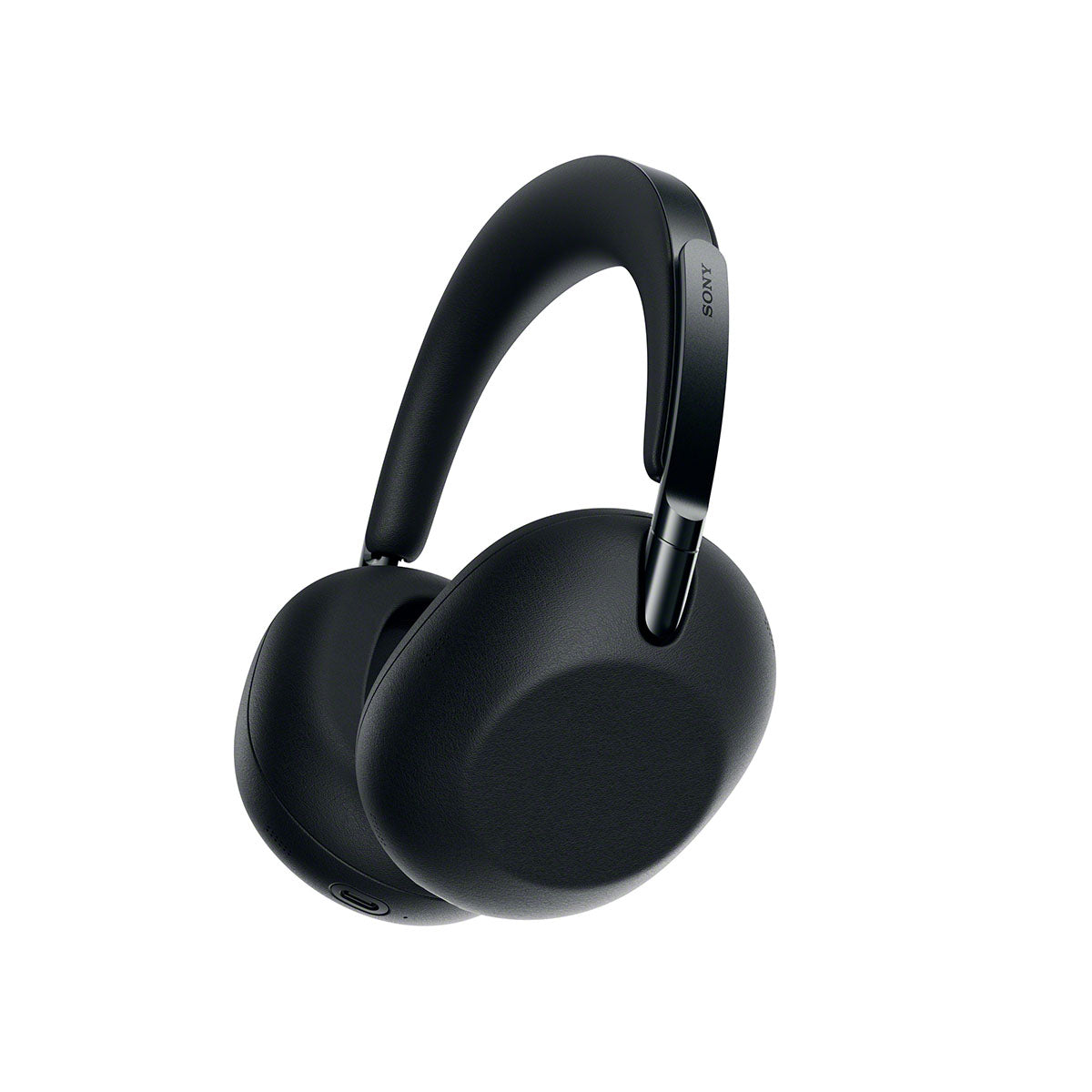
The XM6 is plastic. Good plastic, well-engineered plastic, but plastic. Pick up the Collexion and you know immediately you're holding something different. Stainless steel sliders, stainless steel around every button and port, and the entire outer surface wrapped in oil-resistant vegan leather that Sony spent two years developing.
The Sony logo on each ear cup is mirror-polished against a sandblasted matte background, finished individually by hand. Sony says it's a process no machine can replicate, and when you see the separation between the polished and matte surfaces up close, you believe it. Competing against AirPods Max and Bowers & Wilkins Px8 S2, this level of craftsmanship is what you'd expect, and here you actually get it.
Comfort and Fit
The ear cups are 5mm slimmer than the XM6, but Sony carved out more internal volume so your ear sits inside the cup rather than pressing against the driver. The headband is 10% wider and the padding is 40% thicker. The clamping force is noticeably lighter.
In our experience, the Collexion is the most comfortable Sony headphone ever made. For long listening sessions, travel, and extended desk use, these are in a different category from the XM6.
Weight and Portability
The one tradeoff is weight. The XM6 weighs 253 grams. The Collexion weighs 320 grams. For seated listening that difference is barely noticeable thanks to the wider headband distributing it well. For the gym or a run, the XM6 has a meaningful advantage.
Folding and the Case
The Collexion does not fold. The XM4 folded, the XM5 didn't, Sony brought folding back with the XM6, and now it's gone again on the Collexion. The reason is durability. Sony moved to metal hinges that won't crack the way plastic ones can over time. The tradeoff is a slightly larger footprint.
The included case addresses this well. It has a built-in handle, a magnetic clasp identical to the well-regarded XM6 case, and a slimmer depth profile that fits neatly into an airplane seat pocket. You lay the headphones flat and slide them in with no folding required.
Sound Quality
How the Collexion Sounds
Sony collaborated with Grammy Award-winning mastering engineers at Sterling Sound, Coast Mastering, and Battery Studios to tune the Collexion from the ground up. The brief was faithful reproduction: a wide soundstage, clear instrument and vocal separation, and rich bass that doesn't crowd the midrange.
The driver is completely redesigned with a softer edge for improved bass movement and a unidirectional carbon composite dome for better high-frequency response. The circuit board has been upgraded with thicker copper foil layers and audio components carried over from Sony's Walkman line, including a low-phase noise crystal oscillator and gold-content solder.
To us, the Collexion sounds more spacious and more detailed than the XM6. You hear more of what's actually in the recording. The XM6 has a punchier, more forward presentation that's immediately engaging, whereas the Collexion is the more accurate and revealing headphone. Which one you prefer will come down to what you prioritize.
DSEE Ultimate: What It Actually Does
The Collexion is the first Sony headphone with DSEE Ultimate. The XM6 has DSEE Extreme. The difference matters. DSEE Extreme upscales compressed audio by extending the frequency range. DSEE Ultimate does that and also upscales the bit depth using AI processing.
Importantly, it's not just for old MP3 libraries. DSEE Ultimate actively processes CD-quality lossless audio, meaning everything you stream from Spotify, Qobuz, Apple Music, and Tidal benefits from it. Every stream, not just the compressed stuff.
Because DSEE Ultimate runs on the V3 processor inside the headphones, it also works when you're plugged in via the 3.5mm cable with your phone off. On a plane using the wired connection, DSEE Ultimate is still active. The XM6 cannot do this.
Active Noise Canceling
ANC Performance vs the XM6
The noise-canceling hardware in the Collexion is essentially identical to the XM6: the same QN3 processor, the same 12-microphone array, and the same Adaptive NC Optimizer. In our testing, the Collexion's ANC is very slightly behind the XM6's. The lighter clamping force that makes these so comfortable also means a marginally less airtight passive seal, and that seal is part of the foundation the active system builds on.
The Collexion is still excellent at ANC. It handles engine noise, office background sound, and transit noise very well. But in a direct A/B comparison, the XM6 is marginally more aggressive at blocking low-frequency sound. If maximum ANC performance is your primary criterion, the XM6 has a technical edge.
One thing worth knowing: the Collexion sounds noticeably better with ANC switched off. The processing introduces a small amount of artifact that isn't present when the system is bypassed. In quiet environments, turning ANC off gives you cleaner, more open sound.
Adaptive NC Optimizer and Air Pressure
What the Collexion does have that deserves more attention is an Adaptive NC Optimizer that adjusts in real time to external noise levels, changes in air pressure, and your specific fit. The air pressure component is specifically useful on flights. Cabin pressure changes affect ANC performance, and these headphones compensate for that automatically throughout the flight.
Transparency Mode and Voice Passthrough
Transparency mode on the Collexion is excellent, on par with or slightly better than the XM6. The palm-over-ear gesture activates it instantly: cup your right hand over the right ear cup, the music drops and transparency activates, take your hand away and it returns. This is one of the most useful features on any Sony headphone and works seamlessly here.
Voice Passthrough is a separate setting inside Ambient Sound Control that most people scroll past. Instead of letting all outside sound in, it specifically filters in voices while suppressing background noise. For open offices, transit, and anywhere you want to hear people talking without hearing everything around you, it's more useful than full transparency in many situations.
Battery Life
The Collexion delivers 24 hours of battery life with ANC on and 32 hours with ANC off. The XM6 delivers 30 hours with ANC on. The more expensive headphone has the shorter battery life, and that's worth acknowledging plainly.
Sony split the battery into two cells, one per ear cup, specifically to free up space for the slimmer housing that enables the comfort improvements. It was a deliberate design decision. In practice, 24 hours covers any reasonable listening session, and five minutes of charging delivers another hour and a half of playback.
Sony Collexion Tips and Tricks
9 App Settings Most People Never Find
If you just picked up a pair, these are the settings worth configuring before anything else. Several of them are buried deep enough in the Sony Sound Connect app that most owners never find them.
Tip 1: The "Off" EQ Preset Is the Tuned Setting
Open the Sony Sound Connect app and go to All Device Settings > Equalizer. The preset labeled "Off" is not what it sounds like. That is the professionally tuned signature sound developed through the mastering engineer collaboration with Sterling Sound, Coast Mastering, and Battery Studios. Most people skip past it assuming it means flat or bypassed. It doesn't. That's your intended baseline. Start there before you touch anything else.
Tip 2: Find Your Equalizer Builds a Custom Profile for You
Still in the EQ section, go to All Device Settings > Find Your Equalizer. The app plays a series of short sound samples, asks which you prefer, and builds a custom EQ profile based on your answers. Two minutes, done once, and you have a starting point tuned to your own ears rather than a generic preset. Most people never know this feature exists.
Tip 3: Customize the Listening Mode Button
There's a dedicated Listening Mode button on the left ear cup that cycles through the 360 Upmix modes. By default it steps through all three modes plus standard, which means four presses to get back to where you started. Go to Sony Sound Connect app > All Device Settings > Controls > Listening Mode Settings and uncheck any modes you don't use. If you only use Music and standard, remove Cinema and Game from the rotation.
One important thing to know: when any Upmix mode is active, both the Equalizer and DSEE Ultimate are disabled simultaneously. If you've spent time dialing in your EQ or you want DSEE Ultimate processing your streams, make sure you're on Standard mode.
Tip 4: Run the Spatial Sound Optimization
Go to Sony Sound Connect app > All Device Settings > 360 Reality Audio > Spatial Sound Optimization and run the setup. The app measures the angle of your headphone placement on your head and uses that data to deliver more precise spatial sound. It takes about a minute and makes a noticeable difference to how the Upmix modes perform. Most people skip this entirely and never do it.
Tip 5: Double-Press NC/AMB to Mute on Calls
If you take calls frequently, double-pressing the NC/AMB button on the left ear cup mutes your microphone. Double-press again to unmute. No reaching for your phone, no fumbling with an app. To customize what the NC/AMB button does more broadly, go to Sony Sound Connect app > All Device Settings > Controls > NC/AMB Button and reassign it to whatever you use most.
While you're in Controls, also enable Head Gesture: All Device Settings > Controls > Head Gesture. Once enabled, you can nod to accept an incoming call and shake your head to reject it — no hands, no buttons required.
Tip 6: Enable Battery Care
Go to Sony Sound Connect app > All Device Settings > Battery Care and turn it on. This caps maximum charging at around 80% to protect the battery's long-term health. You lose a small amount of runtime per charge session, but the battery retains its capacity for significantly longer. On a $650 pair of headphones you plan to keep for years, this is worth doing from day one.
Tip 7: Set Up Scene Mode
Go to Sony Sound Connect app > Adaptive Sound Control. When you enable it, you'll find pre-built scenes: Office, Commute Home, Walking, Running, and Gym. Tap into each one and configure what you want the headphones to do in that situation — full ANC, ambient sound, or something in between. The headphones detect your activity automatically and switch settings to match. Most people never find this feature and it completely changes how seamless these feel day to day.
Tip 8: Set Up Quick Access for Instant Music Playback
Go to Sony Sound Connect app > All Device Settings > Controls > Quick Access. Assign a double or triple press of the NC/AMB button to instantly launch and start playing your preferred Spotify, Apple Music, or Amazon Music playlist without touching your phone. Once configured, this becomes one of the most-used features on the headphones.
Tip 9: Enable Automatic Software Updates
Go to Sony Sound Connect app > More > System Update and turn on Automatic Download of Software Updates. Sony continues to add features and improvements after launch. Enabling this ensures you always have the latest firmware without having to remember to check manually.

Sony Collexion vs XM6: Which Should You Buy?
Buy the Collexion if you want the most comfortable Sony headphone ever made, the most revealing sound they've ever put into a wireless headphone, and something that genuinely feels like it was built without any compromises. We think it's worth the price.
Buy the XM6 if you want the best value in the lineup. More battery life, marginally better ANC, and it folds. At $459 it's one of the best value headphones on the market. Nothing about the Collexion makes the XM6 worse than it already was. If you're ready to step up, the Collexion is the real deal.
Frequently Asked Questions
Is the Sony 1000X The Collexion worth it over the XM6? For most people the XM6 is the better value at $459. But if comfort on long listening sessions, premium build quality, and more revealing sound are priorities, the Collexion justifies the $200 premium. The two headphones target different buyers.
Does the Sony Collexion have better ANC than the XM6? No. The ANC hardware is essentially the same, but the Collexion's lighter clamping force means a slightly less airtight seal, which makes the XM6 marginally more effective at blocking low-frequency sound. The Collexion's ANC is still excellent.
What is DSEE Ultimate and how is it different from DSEE Extreme? DSEE Extreme upscales the frequency range of compressed audio. DSEE Ultimate does that and also upscales the bit depth using AI processing. It works on all audio including CD-quality streaming from Spotify, Apple Music, and Tidal, not just compressed files.
Does the Sony Collexion work with DSEE Ultimate when wired? Yes. Because DSEE Ultimate runs on the V3 processor inside the headphones, it works even when plugged in via the 3.5mm cable with no Bluetooth connection. This is exclusive to the Collexion; the XM6 cannot do this.
Why doesn't the Sony Collexion fold? Sony switched to metal hinges on the Collexion specifically for durability. Plastic hinges can crack over time. The trade-off is that the headphones don't fold flat like the XM6, though the included case with built-in handle accommodates them well.
Can you use LDAC and multipoint at the same time on the Collexion? No. LDAC requires more bandwidth than Bluetooth can support across two simultaneous connections. If you're connected to both a laptop and a phone, the codec drops to AAC. For full LDAC quality, connect to one device only and set Priority on Sound Quality in the app.
What is 360 Upmix and when should you use it? 360 Upmix is a spatial audio processing mode that expands stereo into a more immersive sound field. It works best on acoustic music, orchestral recordings, and film content. Note that enabling any Upmix mode disables both the Equalizer and DSEE Ultimate simultaneously.
How do I get the best ANC performance from the Collexion? Run the NC Optimizer and make sure both ear cups are seated flush against your head. There's a wear detection sensor in the left ear cup, and if it doesn't register a proper seal, ANC performance drops. Adjusting the headband for a consistent fit makes the biggest difference.
Does the Sony Collexion have USB-C audio? No. The USB-C port is for charging only. The only wired audio option is the included 3.5mm cable. This is a notable omission at this price point.
What Bluetooth codecs does the Sony Collexion support? The Collexion supports SBC, AAC, LDAC, and LC3 via Bluetooth 6.0. LC3 is what powers Auracast, Sony's support for public audio broadcasts, and sets the headphones up well for the next generation of Bluetooth audio.
We’re Here to Help!
If you have further questions, contact our experts via chat, phone, or email. Or simply visit one of our world-class showrooms to experience speakers, projectors, TVs, and everything in between for yourself before you make a purchase!
If you’re planning your home theater or media room, check out our Home Theater Design page, where we have everything Home Theater related, including our FREE Home Theater Design Tool.
When you buy from Audio Advice, you’re buying from a trusted seller since 1978. We offer Free Shipping, Lifetime Expert Support, and our Price Guarantee. We look forward to serving you!