













McIntosh MB20
Free Shipping On All Orders, No Minimums.
We offer free 2-day shipping on most products within the continental US.
Weekdays - Orders placed by 2pm EST ship same day. Orders placed after 2pm EST will ship the following business day.
Weekends - Orders placed on Saturday and Sunday will ship Monday.
Orders requiring motor freight delivery may take more than two business days. Once your order has shipped, you'll receive a shipping confirmation email with a tracking number for easy tracking.
Orders for Open Box products ship with free ground shipping within the continental United States.
Orders that contain items that are currently backordered, special order, or out of stock will ship complete once all items are in-stock unless otherwise requested.
If you need it faster, you will have the option of choosing a quicker shipping option when you checkout on the website.
At this time, we do not ship internationally and orders to Hawaii and Alaska may incur an additional shipping charge. Please contact us at 888.899.8776 or email support@audioadvice.com to confirm.
Rerouting and Address Changes
We cannot make ANY address changes once an order is placed. If you are unable to accept delivery of your package as ordered, we will need to cancel your order, return the package to sender and have you replace your order through our website.
Keep the Box
We suggest you keep the shipping box or boxes for at least 30 days. It is actually a great idea to keep boxes for audio products for the life of the product. Having the box and all packing will increase the trade-in value should you decide to move up and they are handy to have should you ever need to send the unit in for repair.
How To Receive a Motor Freight Order
The trucking company will contact you to schedule a convenient time to deliver the order. Please note that you must be present for delivery.
Visually inspect the box to make sure you see no signs of damage. If you notice any damage at all, take some pictures with your phone and make a note of them on the delivery receipt the driver will ask you to sign. If it is obvious that the product is damaged, please refuse the order and contact us immediately at 888.899.8776 or email support@audioadvice.com.
Open your box as soon as possible and inspect the product for damage and contact us if you find anything wrong.
FedEx Freight Service Comparison
| Feature / Service | Scheduled Curbside Delivery | White Glove Delivery |
|---|---|---|
| Scheduled delivery appointment | ✔ | ✔ |
| Delivery location | Ground level only (garage, front door, loading dock) | Room of choice, any floor |
| Delivery team | 1 person | 2 people |
| Placement inside home/business | ✘ | ✔ |
| Upstairs / downstairs delivery | ✘ | ✔ |
| Unpacking | ✘ | ✔ (upon request) |
| Packaging removal | ✘ | ✔ (upon request) |
| Assembly / installation | ✘ | ✘ |
| Old item removal | ✘ | ✘ |
At Audio Advice, we pride ourselves on customer satisfaction. We'll bend over backward to make sure you're 100% satisfied and we won't accept anything less. We offer 30-day hassle-free returns and personalized service from real, live people.
If an item doesn't meet your expectations, you may return or exchange it in its original condition and packaging within 30 days for a full refund, minus shipping fees. Items shipped back in like new condition through standard shipping carriers will incur a minimum $15 return shipping fee. If the items were initially shipped through free scheduled delivery via motor freight (commonly referred to as LTL), returning them will result in return shipping fees starting at $150. These items include but are not limited to, oversized items such as TVs, certain subwoofers, floorstanding speakers, furniture, and most items weighing over 75 pounds. Return fees will also apply for exchanges. We want to treat your system as if it is our own and want you to be completely satisfied with your purchase.
Please see the instructions below. We only accept returns for any product purchased directly from our website. If merchandise is not returned in its original condition or is missing packaging, manuals, accessories or other parts, or the resale value of the product has been impaired, a partial refund will be given and calculated on a case-by-case basis.
Non-Returnable Items
The following items cannot be returned or cancelled:
- Special/Custom Order Items
- Gift Cards
- In-ear headphones cannot be returned once the packaging has been opened due to personal hygiene reasons. Please contact our customer care team if you'd like help choosing.
-
Turntables With a Broken Stylus: All turntables ship out with the stylus intact. If you return a turntable or phono cartridge with a broken or missing stylus you will be subject to a return fee. Please be careful when setting up your turntable and contact us with any questions.
Is It Easy To Return An Item?
Yes, simply give us a call at 888.899.8776 or you can email our support team at support@audioadvice.com. Many times our team of experts can help figure out why the product might not be working like you expected and get things fixed over the phone, so don’t be surprised if we ask a few questions, we love troubleshooting!
If our tech help can not make you happy, we will email over a return shipping label with a Return Number.
Hopefully, you saved all of the original item’s box and packaging inserts. You will want to pack back up your return or exchange in the same way it came out of the original box. Once you have everything packaged correctly, tape the box on the top and bottom to assure it stays together. If Audio Advice shipped the item to you inside a second box, it's a good idea to use that same extra box to help prevent damage on its way back to us. To avoid it accidentally coming back to you, use a magic marker to cross out the old shipping label or just tear it off.
The return shipping label we send you will have our address on it, just make sure you take the box to the right shipper (UPS, FEDEX, or USPS) as per the label.
If you are close to one of our stores, please let us know if it is more convenient for you to return it to us directly. You will still need to get a return number by contacting us and shipping and/or restocking charges may apply.
When Will I See My Refund?
It usually takes around 7-14 days for the refund to show up on the payment method you used. We do inspect all returns for damage and accuracy of the item inside the box before issuing a refund. Some items may be subject to shipping and restocking fees.
Can I Exchange My Purchase For Something Different?
Sometimes those big speakers just don’t fit in the room or you might have bought a small subwoofer and later found out you’d love a bigger one. If you would like to make an exchange within 30 days of receiving your item, just give us a call at 888.899.8776 or email support@audioadvice.com and we will help work out the details. Additional shipping charges and return costs may apply.
How Do I Cancel An Order?
If the item has already shipped out or is a special order item, it is not possible to cancel the order. Please contact us at 888.899.8776 or email support@audioadvice.com to start the return process.
What If I Find Shipping Damage?
We need to know right away about any shipping damage. Please contact us at 888.899.8776 or email support@audioadvice.com within 48 hours of your delivery so we can get the ball rolling on making things right. It’s very helpful to take some pictures and email them to us if possible.
Can I Refuse A Shipment?
You can, but unless the item is damaged, shipping and restocking fees will be deducted from your refund. If your item arrives damaged and you are lucky enough to be there, snap some quick pics and refuse the order. Then contact us so we can get a replacement on the way.
What Happens If My Order Is Defective?
This is actually pretty rare, most consumer electronics work fine out of the box 99.9% of the time. We’d like for you to contact us first by calling 888.899.8776 or email support@audioadvice.com so we can help get to the bottom of things. If your item is indeed defective during the first 30 days, we can usually exchange it for a new, replacement unit.
What About Service After 30 Days?
Audio Advice has a great relationship with all of our brands and can help you with warranty service by the brand after our 30-day guarantee period. Even after the warranty expires, we can arrange for service by the brand on products purchased from Audio Advice. Just call 888.899.8776 or email support@audioadvice.com.
How Do You Determine A Restocking Fee?
You may not believe it, but sometimes we receive items back that were put in the box with zero packaging and are completely destroyed or are missing many of the pieces that came with the item. We also track serial numbers and will get back different serial numbers. We’ve even seen different items than what we shipped out be returned. However, it’s very important to package your return properly so that nothing goes missing or gets damaged in shipping, which will result in a restocking fee or even no refund at all. If a product is opened and the market value of the product is reduced, then a restocking fee may be applied to the cost of restocking and the reduced market value of the product. The bottom line is if you treat us fairly, we will do the same.
Audio Advice strives to provide industry-leading support and service while also maintaining the lowest prices available on products for our customers. We work hard with our vendors to bring our customers the best products at each price point. As a part of that process, we work with our vendors to provide the lowest pricing in our stores and on our website.
Our prices should always be the same as any other authorized dealer, including big-box retailers and major online retailers.
If you believe that you have found a lower advertised price from a legitimate authorized seller, call us and let us know so we can make sure we can correct any inadvertent error on our side. As a matter of policy, we update our prices automatically if a vendor changes its authorized pricing policies, so we generally have the best prices all the time. Increasingly, there are knock-off copies of products online, usually sold by non-authorized dealers.
Please be sure that the item meets the following conditions:
- The item is brand new, in stock, and available for purchase
- The item has the identical model number, color, etc as the item on our site.
- The seller is an authorized dealer
As always, our goal is to provide a terrific customer experience, including industry low prices. We appreciate your support.
Overview
The High Notes

Bluetooth Any Way You Can Imagine It

McIntosh Quality Throughout

Inputs and Outputs Galore
Company & Product Overview
If you know the name McIntosh, you are aware they produce some of the best built and natural-sounding audio equipment in the world. They have been headquartered in Binghamton NY for over 70 years with some employees working with them for many decades.
When McIntosh sets out to make a new type of product, their engineers are not happy unless it performs better than anything else in its class. When we first heard about the new McIntosh MB20 Bluetooth transceiver, we were very curious to see what McIntosh DNA would find its way inside a product that most people view as just an accessory. In typical McIntosh fashion, the MB20 is far from an accessory and designed with more flexibility than you might think at first glance.
In this article, we will go over all the technical details of what the MB20 can do, and share some use cases on some of the ways you might use it in your home.

Design & Build Quality
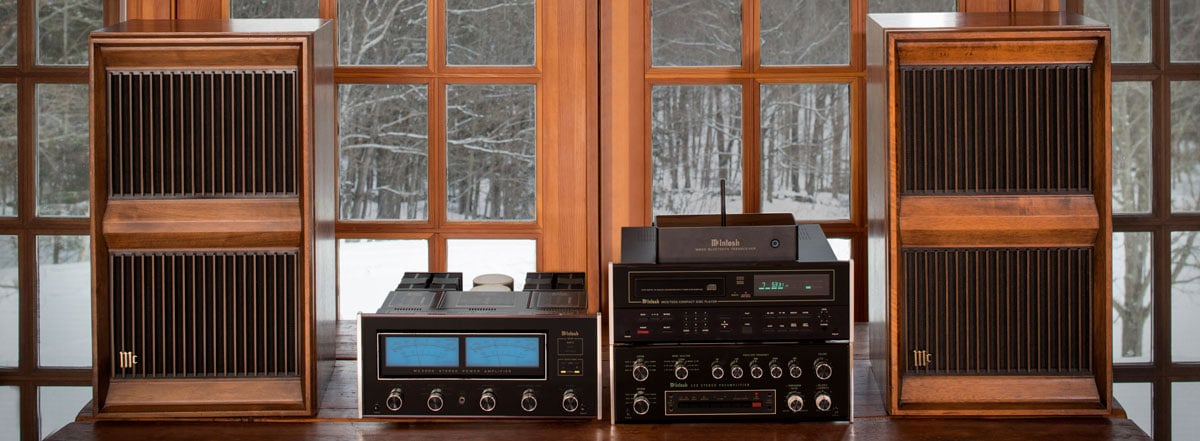
The engineers developed the MB20 to address the vast expanse of legacy McIntosh systems out there that had no way to access the new world of streaming music. McIntosh gear lasts for several decades and with streaming-only becoming mainstream in the past few years, there are over 60 years of McIntosh systems in people's homes with no way to easily stream music. And of course, like they always do, when they design a new product, the engineering team usually comes up with some pretty unique features.
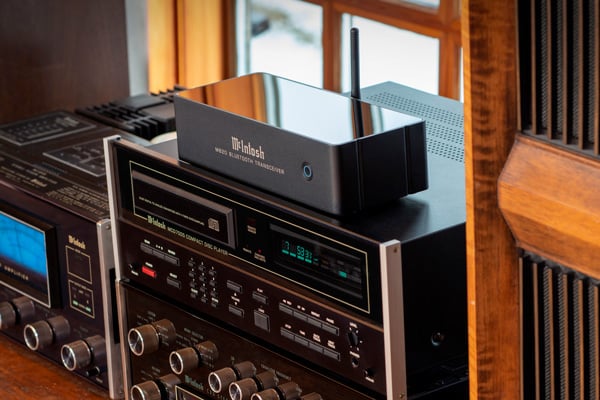
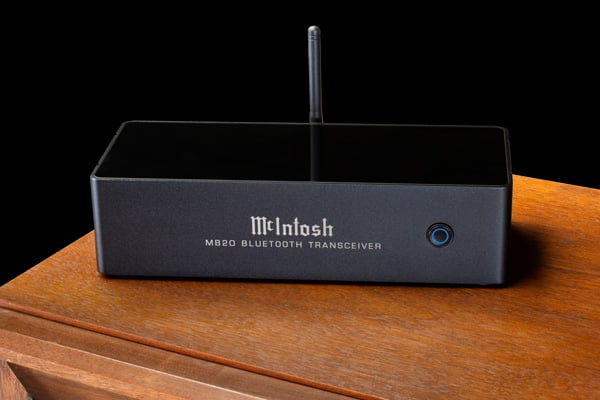
Most Bluetooth products you will see are very tiny in physical size with a limited number of connections. The MB20 is far larger due to the better circuitry and audio input and output options. Generally, McIntosh pieces have the classic glass front that is beautifully backlit, but for the MB20, McIntosh chose to go the simple route to keep the price down to make it available to a wider group of their customers and people who own other high-performance audio pieces without streaming.
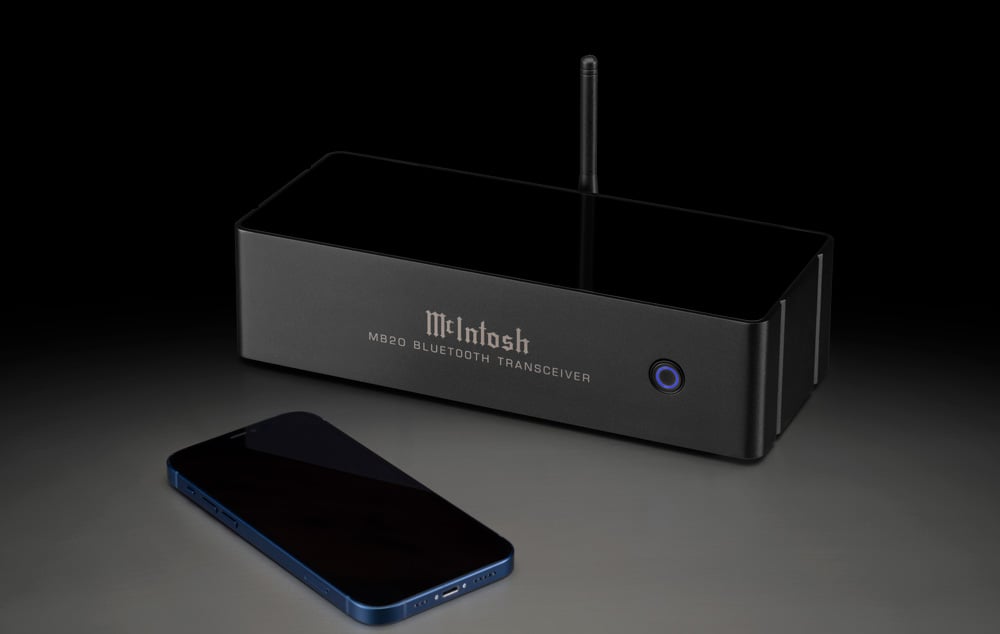
The MB20 is a basic black box with the McIntosh logo and product name screen printed on the front with the most connections on the rear we have ever seen on a Bluetooth piece of gear.
Features & Technology
Unless you have been totally disconnected from any tech at all, you have probably used Bluetooth at one time or another. It was developed as a way to send audio wirelessly between devices. When it first came out, the audio quality was pretty low, but as with all tech, things have progressed to where it is actually quite good, almost rivaling a wired connection.
Qualcomm, the developers of Bluetooth tech, came out with Bluetooth aptX HD in 2016 and it has been widely adopted as a great way to transmit audio from one device to another with minimal signal loss. As you might suspect, the MB20 uses aptX HD. This transmission method is still compressed but is pretty close to a hard-wired connection.
If you are into audio, you probably also know the quality of the DAC (digital to analog converter) makes a big difference in the sound. This is the device that converts the digital signal to analog. McIntosh uses a very high-performance DAC in the MB20 which is a 32-bit DAC with 192kHz internal processing to optimize sound quality.
Bluetooth aptX HD is present in most new models of wireless headphones and many Android-based phones, but is not available on Apple products. However, it is backward compatible with the Bluetooth transmitter on an iPhone.
Most Bluetooth accessories are either transmitters or receivers, but the MB20 can do both — although not at the same time. This means you can send a streaming music signal to it to get the sound into your legacy system, or you could use it to send the audio from your system to a pair of wireless headphones for example.
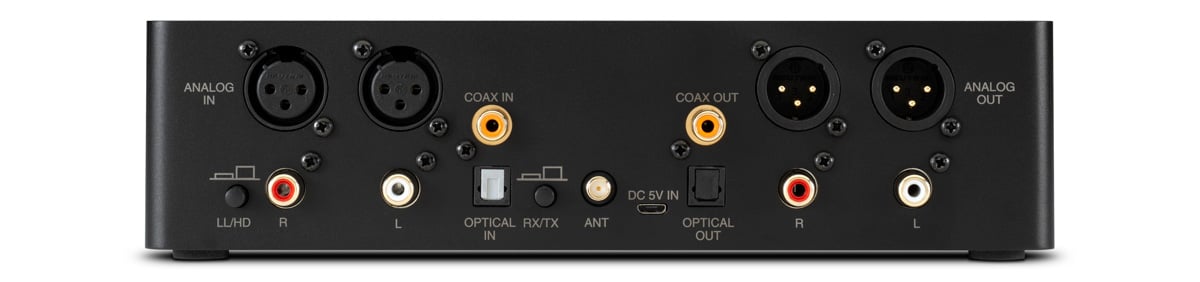
The number of inputs and outputs on the MB20 is what really impressed us and caused us to start thinking of interesting ways to use it. For inputs, you get a pair of balanced audio inputs, RCA audio inputs, Toslink digital in, and coax digital in. The output side has the exact same count and type. If you are going to use the digital audio outputs the signal will be 96kHz to make it more compatible with legacy DAC’s on the market that might not be new enough to do 192kHz. The inputs are all auto-switching, meaning whichever one has a signal present will be switched to.
The rear panel has two small buttons you might find yourself accessing if you plan to use the MB20 in more than one type of situation. We do wish these were on the front panel for easier access, but once you know where they are on the rear, it's pretty easy to get to them by feel. One button switches the unit between transmission mode or receive mode. The other puts it in a low latency mode or high definition mode. Bluetooth does have some latency or delay as some people call it which makes the low latency mode great for some applications we will go over next.
Performance & Use Cases
Most well-made Bluetooth devices have a pretty long-range as long as you do not have a lot of massive walls to go through. In almost all homes, you should be able to get from one side of your home to the other with no dropouts. The MB20 is no different and gave us a solid connection once we were paired up. We even found we could walk out of our store into the parking lot and maintain a solid connection.
Let’s go over some of the potential use cases for the MB20 Bluetooth Transceiver.
The most obvious one is setting it up as a receiver to get streaming music from your smartphone into your audio system. In this case, you make sure the button is in RX mode on the rear and the other is in HD. Then you can simply connect the audio outputs or digital outputs to your system to bring the world of streaming audio into any legacy system.
Another use might be for those of us who enjoy wireless headphones and the freedom they offer to roam around your home or just be cord-free. Here, you would set it up for TX mode and keep the quality setting in HD. With all of the rear connections, there are a multitude of ways to get a signal from your FM tuner, CD player, turntable, or tape deck into the MB20. For most older McIntosh systems, you would simply connect up a tape output that would allow you to choose the source being sent to the MB20. Then, you can walk around your home enjoying the sound from your audio sources on wireless headphones or even a wireless Bluetooth speaker system in another room.
Many of us need a solution to watch TV without disturbing others in the house, which brings up another use case for the MB20. Most TV’s have an optical audio out you could connect up to the MB20 and then transmit the TV sound to your wireless headphones. In this case, you set it to TX and want to put the quality button in LL for low latency to keep the audio in sync with the picture.
It is possible you have two audio systems in different parts of your house and have always wanted a way to connect them. Well, if you purchase a second MB20, you can put one in transmit mode and the other in receive. Then you could send a signal from one system to the other. You will need to make sure the quality button is in the same position on both of them. If you want both systems to play at the same time and you can hear them together, you will want to use low latency mode to keep them in sync, but if you just want to go from one to the other we suggest you use the HD mode.
As you can tell, with so many input and output options, the MB20 is extremely flexible and its use is only limited by your imagination!
Overall Recommendation
As Bluetooth receivers go, the MB20 is at the high end of the price range. But it is built like a McIntosh piece and performs flawlessly. And if you are a McIntosh fan, you typically don’t want any other kind of electronics in your system. We do feel, if you only wanted to stream music into an older system, there are some other component options from Sonos and Bluesound that can give you a wired connection and better performance. These do cost more though and do not have the transmit option like the MB20 does. We think most users will find the MB20 is a great way to get into the world of streaming and also use it with their wireless headphones for TV, audio sources, or both. In that respect, there is nothing on the market like it with the high-tech DAC’s found in the MB20. Once again, the engineering team in Binghamton, NY has come up with a winner!


